3D Flight Simulator
Airplane

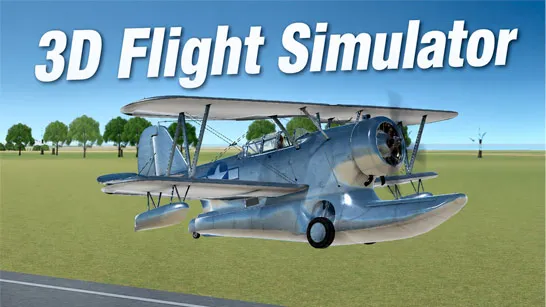
3D Flight Simulator






| Rating | 4.4 / 5 (editorial) |
| Played | 200 times (est.) |
| Developer | FreezeNova |
| Released | 2023-01-01 |
| Platform | Desktop |
| Technology | HTML5 (WebGL) |
| Category | Airplane Games |
3D Flight Simulator — Take the Controls of Real Aircraft
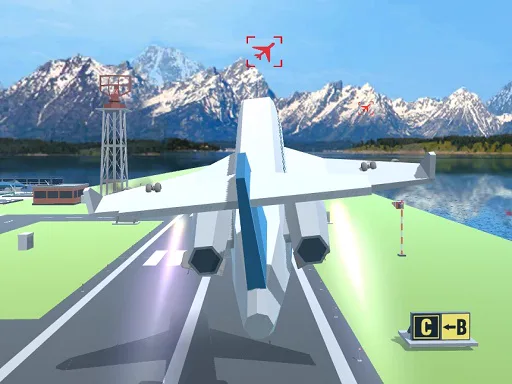
3D Flight Simulator is a realistic airplane flying game. Climb into the cockpit of commercial airliners and light aircraft, accelerate down the runway, rotate into the sky, navigate the open air, and bring the plane back down for a safe landing — all in full 3D. It's one of the more authentic browser flight experiences, and it's free to play with no download.
What Kind of Game Is This?
This is a 3D flight simulator, not an arcade racer. You manage throttle, pitch, roll, and yaw across the whole flight envelope: taxi, takeoff, climb, cruise, descent, approach, and landing. There are no power-ups or enemies — the challenge is the aircraft itself, the runway, and the physics of keeping a heavy machine in the air and bringing it down gently.
That makes it perfect for players who want the feel of flying: watching the runway drop away on takeoff, trimming the plane for level cruise, and lining up the approach lights before flaring just above the tarmac.
Core Mechanics
- Throttle — controls engine power and therefore speed and climb rate.
- Pitch / roll / yaw — control the nose up/down, banking, and rudder. Coordinated inputs keep flight smooth.
- Takeoff — build speed on the runway, then pull up (rotate) once you're fast enough to fly.
- Cruise — trim the aircraft to fly level; manage altitude and heading.
- Landing — the real test: line up with the runway, descend on a shallow glideslope, reduce speed, and flare just before touchdown so you don't slam in.
- Multiple aircraft — switch between planes with different weight, speed, and handling characteristics.
Controls
- Throttle: W/S or the throttle slider (full power to idle).
- Pitch: arrow up/down (nose up/down).
- Roll: arrow left/right (bank to turn).
- Rudder / yaw: A/D or rudder controls.
- Camera: switch views (cockpit, chase, tower) to help with landings.
The Skill Is the Landing
Takeoffs are straightforward — get enough speed and pull up. Landings are where 3D Flight Simulator separates pilots from passengers. You have to arrive at the runway at the right speed, on the right line, descending gently. Come in too fast and you float or overshoot; too slow and you stall and drop; too high and you land long. The flare — easing the nose up just before the wheels touch — is the satisfying bit that took real pilots hundreds of hours to learn. You'll crash it a lot. Then you'll stick one, and it feels great.
Tips & Strategy
- Build speed before rotating. Pulling up too early stalls the plane back onto the runway.
- Make small corrections. Heavy aircraft overcorrect violently; gentle inputs keep it stable.
- Plan the approach early. A long, shallow, straight descent is far easier than a last-minute dive.
- Manage speed on landing. Reduce throttle gradually; arrive slow but above stall speed, then flare.
- Use the chase camera to judge distance and the cockpit view to judge attitude.
- Start with a light aircraft. It's more forgiving than a heavy jet while you learn the feel.
FAQ
Is 3D Flight Simulator free? Yes — completely free in your browser, no download or sign-up.
Does it work on mobile? It's primarily a desktop game (precise multi-axis controls). It may run on tablets but is best on a computer with a keyboard.
Do I need a joystick? No. Keyboard controls work fine, though the experience feels closer to real flying with one.
Is it realistic? It models the core flight envelope — throttle, pitch, roll, takeoff, and landing — closely enough that the feel of flying comes through.
If you've ever wanted to know what it's like to take the controls of a real aircraft, 3D Flight Simulator is a free, authentic-feeling way to find out. Line up on the runway and take off.
You May Also Like
Discuss 3D Flight Simulator
0 commentsLoading comments...